Features Overview
GoSuki is a blazing-fast, real-time bookmark manager designed to streamline your browsing experience. It works in the background, automatically saving and organizing bookmarks across all browsers and profiles.
Core Functionality
Real-time Bookmarking
GoSuki continuously monitors your browsers and automatically saves new bookmarks as you browse the web. This eliminates the need for manual bookmarking and ensures that your bookmarks are always up-to-date. It operates seamlessly in the background with minimal impact on your system’s performance.
How Real-Time Monitoring Works (Technical Insight)
GoSuki achieves real-time synchronization by directly observing your browser’s native bookmark files (e.g., places.sqlite for Firefox or Bookmarks for Chrome). It uses file system watchers to detect changes to these files as soon as your browser saves them. This method requires no browser extensions or modifications, allowing GoSuki to run discreetly while maintaining high performance and compatibility.
Bookmark monitoring overview

Universal Shortcut
Leveraging the familiar Ctrl+D shortcut, GoSuki provides a consistent bookmarking experience across all supported browsers. Simply press Ctrl+D while on a webpage, and GoSuki will automatically save it as a bookmark. This integration with native browser functionality keeps bookmarking intuitive and effortless.
Tagging
Organize bookmarks with ease using GoSuki’s tagging system. Add tags to your bookmarks by including #tagname in the bookmark title or description even if the browser does not support tags natively such as Chrome. Tags allow you to categorize and quickly find your bookmarks, making it easier to manage a large collection. You can use multiple tags per bookmark for even greater organization.
Multi-Device Synchronization
GoSuki provides seamless multi-device bookmark synchronization to keep bookmarks consistent across all devices.
Real-Time P2P Sync
Gosuki+ subscribers get real-time peer-to-peer sync that automatically synchronizes all bookmark metadata including tags across any number of devices without third-party tools. This enables you to synchronize bookmarks over your local network or through secure VPN and overlay networks like wireguard and Tailscale.
By default, the master node alias is set to the system hostname. Configure via alias in [p2p-sync] config.
You can also run a master node in a self-hosted manner inside a container to achieve centralized access to bookmarks aggregated from all your interconnected devices.
Using Syncthing
For users who don’t have Gosuki+, there’s a free alternative using Syncthing for file-based synchronization. This method requires manual setup but works on all devices including mobile, though it only synchronizes URL, Title, and Description (tags not synchronized).
Both methods keep bookmarks up-to-date across browsers and devices without needing browser extensions or complex configurations.
Archiving
GoSuki integrates with ArchiveBox, a self-hosted web archiving tool, to automatically save and preserve web content for offline access. This feature leverages GoSuki’s powerful Marktab system to trigger automated archiving of bookmarks tagged with @archivebox.
Accessing Bookmarks
GoSuki offers three intuitive access methods tailored to your workflow—whether you prefer a sleek web interface, terminal-based tools, or command-line automation.
Web Interface (Primary)
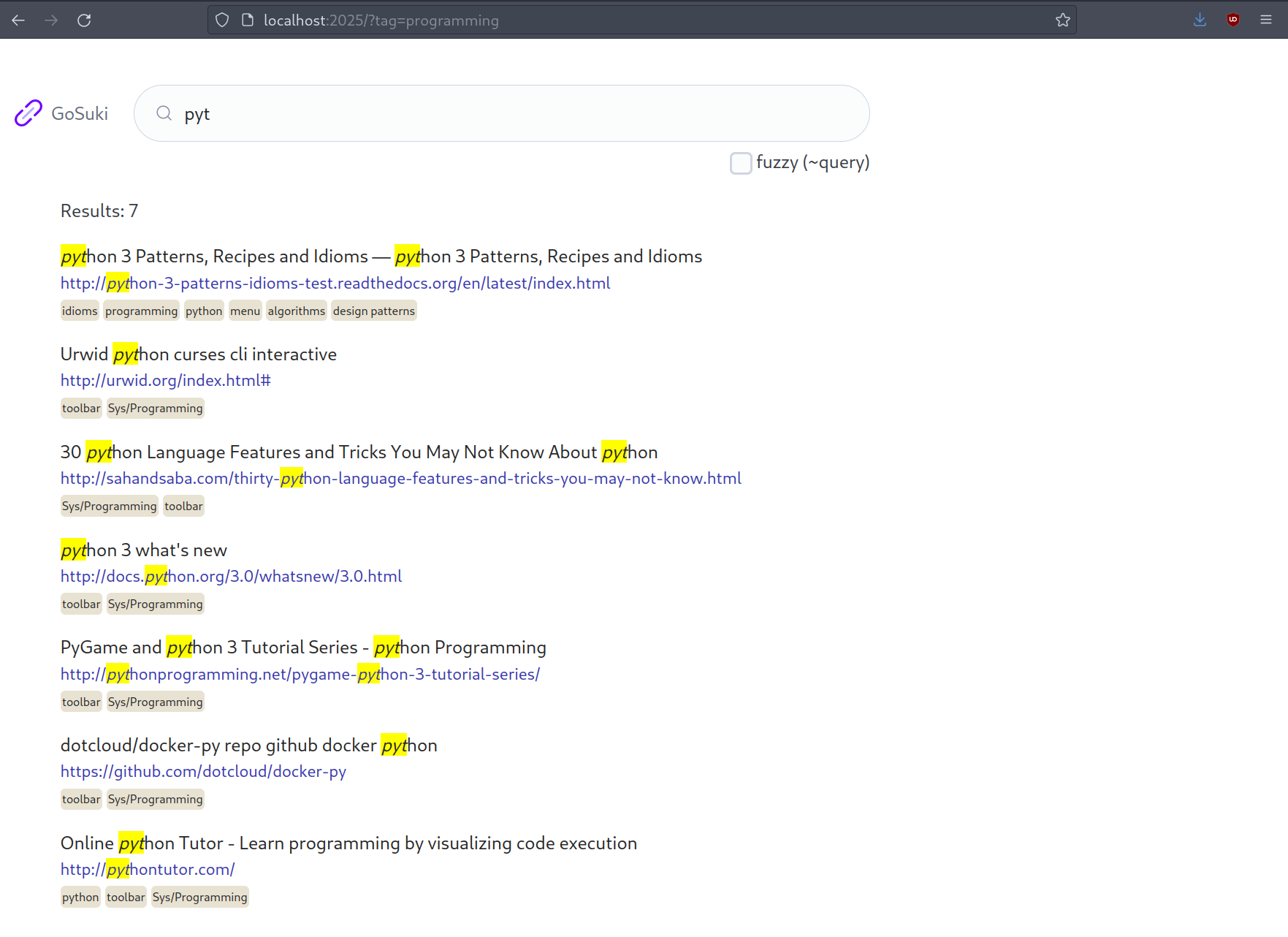
The Web UI is GoSuki’s main interaction point—lightweight, responsive, and optimized for quick searches. Access it at http://127.0.0.1:2025 (configurable via --listen CLI flag or [webui].listen config key). Key features:
- Fuzzy search with
~prefix: Instantly find bookmarks by title, description, or tags. - Tag toggle filter: Click tags in the search UI to quickly toggle them on/off as filters.
- Configurable listen address: Bind to a custom IP/port via
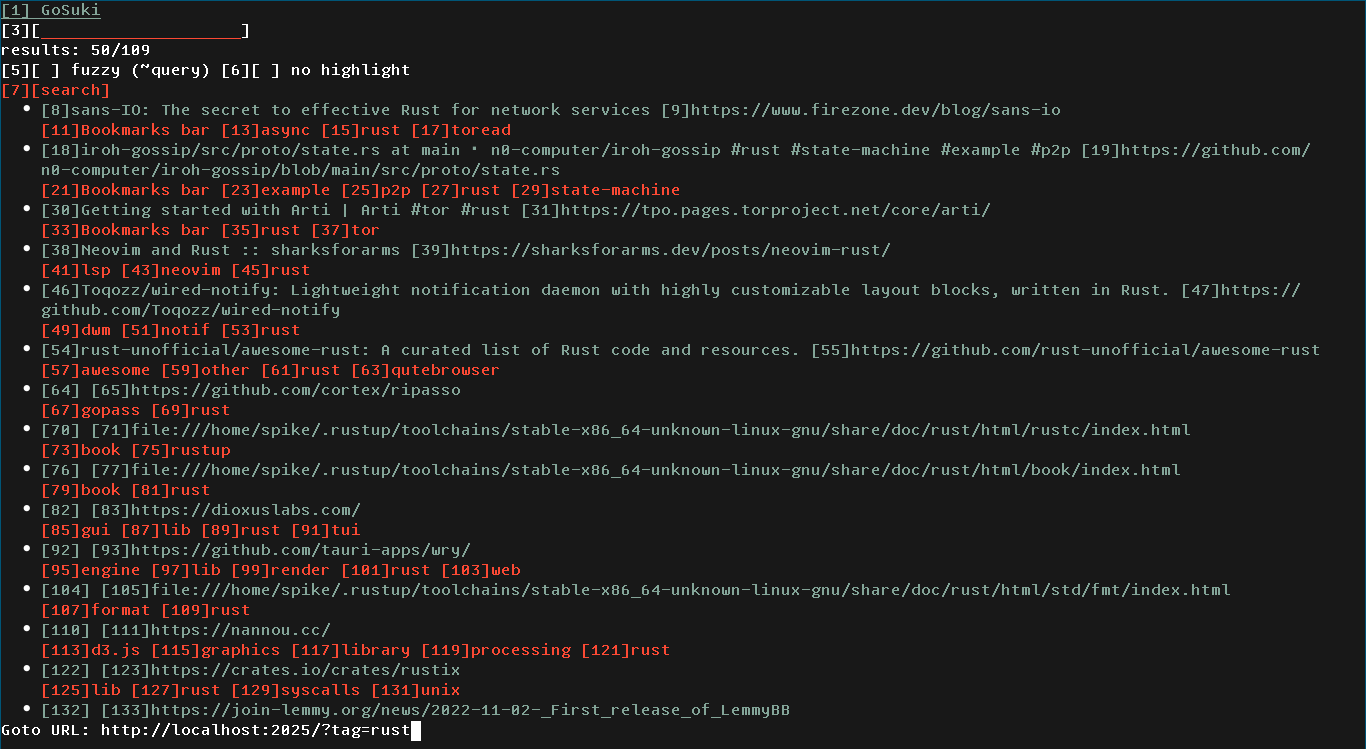
--listenCLI flag or[webui].listenconfig key (default:127.0.0.1:2025). - No JavaScript required: Works with text-only browsers like
w3morlynx, ideal for low-resource systems. - Real-time results: Keywords highlighted as you type for easy scanning.
Terminal User Interface (TUI)
For setup verification and debugging, use gosuki -T start to launch the interactive TUI mode. It provides:
- Real-time status display: See browser detection and module loading progress.
- Progress tracking: Monitor bookmark parsing in real time.
- Quick overview: Visual summary of initialization steps.
Ideal for developers or users needing transparency during startup.
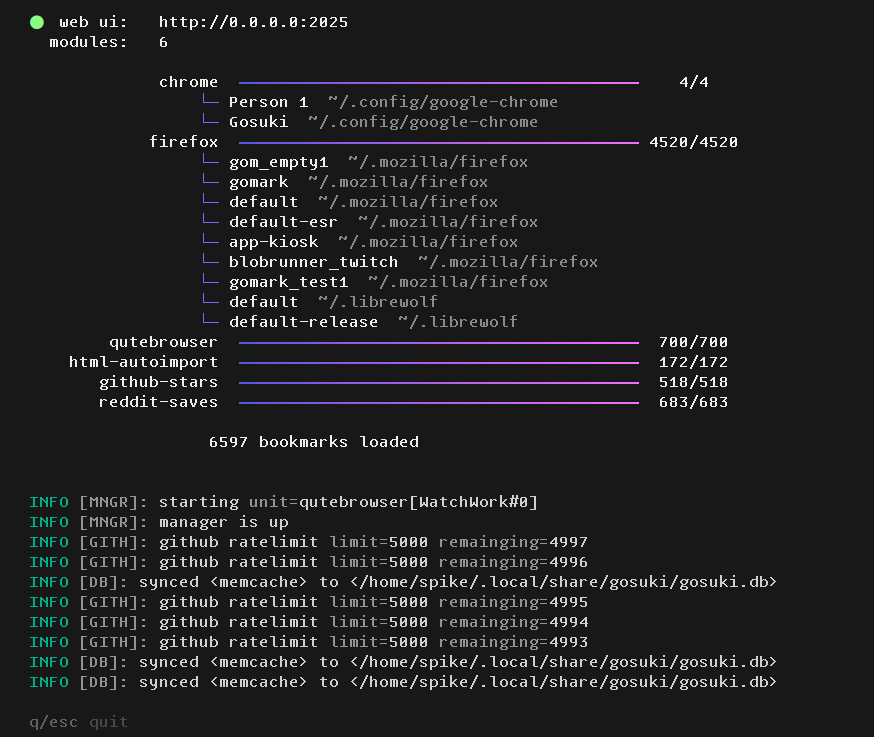
TUI interface
Command-Line Interface (CLI)
The suki tool is a minimalist CLI utility for scripting and workflow integration. Features:
- Natural language queries: Search with phrases like
suki "work site". - Advanced syntax: Use
:tagfilters (e.g.,suki search reddit :linux). - Sort results: Use
--sort(-s) to sort search output by date, title, or other criteria. - Dmenu/Rofi integration: Pipe output to fuzzy finders for seamless desktop access.
Perfect for automation and quick bookmark management.
Cross-Platform & Compatibility
Cross-Browser Support
GoSuki runs on Linux, macOS, Windows, FreeBSD, OpenBSD, and NetBSD. It supports browsers from the Firefox family (Firefox, Librewolf, Waterfox, Zen, Icecat), PaleMoon and Basilisk families, and the Chrome/Chromium family (Chrome, Chromium, Brave, Edge). On Linux it also supports browsers installed as Snap or Flatpak packages. See full browser compatibility matrix.
The extension-free, file-based architecture of Gosuki enables it to ultimately support every conceivable type of browser in existence.
Multi-Profile Support
If you use multiple browser profiles (e.g., one for work, one for personal use), GoSuki can handle them all. It manages bookmarks from all your profiles, ensuring that your bookmarks are consistent across all your browsing contexts.
Detecting browsers and profiles
Detect installed browsers and modules
> gosuki modules list

Loading 7 module
Available browsers and modules:

 * chrome               browser
  └─ flavours:  chromium brave
 * firefox              browser
  └─ flavours:  librewolf
 * qutebrowser          browser
 * html-autoimport      module
 * github               module
 * reddit               module
 * p2p-sync             module
List profiles across all enabled browsers
> gosuki profile list

 * chrome profiles:
    Person 1
      ID: Default
      Path: /home/blob42/.config/google-chrome/Default
    Gosuki
      ID: Profile 1
      Path: /home/blob42/.config/google-chrome/Profile 1

 * firefox profiles:
    default
      ID: Profile1
      Path: /run/user/1000/psd/blob42-firefox-sgxajizi.default
    default-esr
      ID: Profile0
      Path: /run/user/1000/psd/blob42-firefox-4fhjhz7x.default-esr-1703798662752
    paypal-sandbox
      ID: Profile2
      Path: /run/user/1000/psd/blob42-firefox-ipf44gr6.paypal-sandbox
    my-custom-profile
      ID: my-custom-profile
      Path: /tmp/foo-profile


 * firefox flavour=librewolf profiles:
    default
      ID: Profile1
      Path: /home/blob42/.librewolf/rlr1x2e9.default
    default-release
      ID: Profile0
      Path: /home/blob42/.librewolf/5got735e.default-release
Buku Compatibility
For users familiar with the Buku bookmark manager, GoSuki offers seamless compatibility. You can import your existing Buku database into GoSuki and continue managing your bookmarks as you always have. This makes it easy to transition to GoSuki without losing your existing bookmark collection.
Note
GoSuki stores a Buku compatible database in $XDG_DATA_DIR/gosuki/gosuki.db for easy backup or migration.
Advanced Features
Hooks
The Hooks feature lets GoSuki execute custom actions when specific tokens are detected in bookmark data fields (tags, title, description, etc.). Hooks use a flag-based execution model and are configured via marktab rules. Combined with Marktab for pattern-based actions, this gives you complete control over bookmark automation.
Marktab
Marktab’s a built-in hook system for defining custom scripts based on patterns in the URL, title, or description of your bookmarks. The format is similar to a crontab file, making it easy to define complex rules and actions. This allows you to automate even more advanced tasks and customize your bookmarking experience to your exact needs.
Tip
#archive #urgent could trigger an automated archive script, moving the bookmark to a dedicated folder.
Folders Become Tags
Many users organize their bookmarks in a tree structure with folders. GoSuki transforms this hierarchical structure into a flat, tag-based structure. While this happens passively, it simplifies bookmark management and makes it easier to find what you’re looking for. This transformation happens automatically without needing manual work.
This flattening simplifies searching (e.g., #pdf vs. navigating nested folders) while preserving your original folder structure in the background.
Custom Modules
GoSuki’s built as a modular system with plugins. A plugin can be anything that imports data that can be mapped into bookmarks. This allows you to integrate GoSuki with other services and applications, bringing all your important links into one place. For example, the Github Stars module fetches the user’s Github stars and stores them as bookmarks, providing a convenient way to access your favorite repositories. The possibilities are endless, and developers can create their own custom modules to extend GoSuki’s functionality.
Beyond GitHub Stars, modules can integrate with APIs (e.g., #twitter for saved tweets) or local data (e.g., #notes from a text file).